
One of the most common challenges I face when coaching teams is getting their work unstuck and flowing. When I start working with teams, they always seem to be dealing with the same problems:
- It’s difficult for them to get anything done
- They have cards over a year old on their Jira board.
- They spend lots of their time planning and re-planning the same work.
My approach to helping teams get out of these situations is less about changing how the team does their work and more about giving them new ways to think about and manage their work. An example of giving them a new way to think about their work is introducing the concepts of working time and waiting time.
Most work is waiting most of the time.
When a piece of work flows through a team’s system, there’s the working time when the team is actively working on the item, and there’s the waiting time when work is either waiting to be picked up or the work is blocked. Most work is waiting most of the time. For a piece of work, total waiting time greatly outweighs working time. So instead of focusing on working time and trying to make workers more efficient, we instead focus on reducing the waiting time.
The big management leverage is to focus on flowing the work faster, and focus on the waiting times rather than the working time.
David Anderson, Adoption of Lean/ Kanban Principles – Part 1
The way we reduce the waiting time includes techniques like:
- Ensuring the team’s kanban system visualizes real work for the team
- Ensuring each piece of work is a whole idea
- Increasing the team’s sensitivity to waiting.
Here are some patterns that make it difficult for things to flow related to waiting time and some techniques I’ve found helpful to solve them.
Visualize the Team’s Actual Work
Whether it’s a “testing story” where we’re waiting to test the work that another team deploys or tracking all the work required by multiple teams to deploy a new service, in each of these cases, things are making it into your system which your team cannot work on.
When a team visualizes different work items related to other teams are visualized and treated the same, I usually discover a team with a poor understanding of dependencies. And it’s worse than not knowing what their dependencies are, but more fundamentally, it’s that these teams don’t have a clear and shared understanding of what a dependency is and how to manage them:
- They can’t articulate what a dependency is.
- They don’t know how to treat dependencies differently than regular work.
- They don’t have effective ways to collaborate with other teams on dependencies.
When this situation occurs, teams can find themselves with boards polluted with things they can’t act on, adding noise and taking the attention away from the work they should focus on.
A kanban system is a way to visualize and optimize the flow of value. Unless you’re more interested in your system acting like a reminders app, keep the work of other teams off your board. Keep your system focused on visualizing and optimizing the flow of value, and find a better way to track those other things.
Each Piece of Work Should Be an Independent, Whole Idea
I commonly get a question from teams: “How do you manage tasks or dependencies between items on a kanban board?”
The simple answer is “Don’t.”
If items on your board are stuck waiting for other things to catch up before they can be developed, tested or deployed, then you have a story-slicing problem. When this occurs, I refer to it as having work that doesn’t represent a whole idea.
An example of how this problem materializes is when a developer or tester pulls pull in multiple items simultaneously. When this happens, I’ll ask, “Working on multiple items at once seems a bit much. Why not make it easier for yourself and work on one at a time?” And I’ll get a response like, “These all go together.” If they all go together, shouldn’t one card represent the work!?
When cards on your board only represent parts of a whole, it can make understanding what your kanban system is telling you very ambiguous. Improving your kanban system’s usefulness starts with identifying the value you want to deliver.
To find the whole idea behind your work, probe what “Done” looks like. For example, imagine seeing a card on the board that says, “Add a table to order database.”
A: “This task says we’re adding a table to a database. Can you tell me what happens after the table gets added?”
B: “Oh, then we can save customer data when they make a purchase.”
A: “And what can we do with the customer data?”
B: “We can create a report with more details about customers and their past purchases.”
A: “It sounds to me like this work is about being able to generate a customer purchase history report. Is that right?”
B: “Yes, that’s it.”
Being able to answer “What is this work about?” is the crucial idea. If you can’t answer that, your work doesn’t represent a whole idea, and it will be difficult to define what done looks like. Without a clear definition of done, it will be harder for items to flow into “Done” smoothly.
Only pull work into your system and commit to it when you know what “Done” looks like and you don’t see any immediate obstacles preventing you from getting there.
Teams Should Develop a High Sensitivity to Delay
When introducing the idea of waiting time, we said there were two types of waiting time:
- A work item waits in a queue for someone to pick it up.
- The team cannot pick up a work item or has to stop working on something because they encounter an impediment.
The outcome in both cases is that work gets delayed. Addressing the first type of waiting involves paying attention to hand-offs, queues, and item aging. For the second type, we can only do so much to prevent blockers from happening. What we can do, however, is respond to blockers and address them with a sense of urgency.
When I talk about a blocker or impediment, here’s what I’m talking about:
Blocker or Impediment
Something that makes it impossible to start or finish something we want now.
Troy Magennis
Like dependencies, how people understand blockers directly influences how they deal with them. When teams don’t have a shared definition of a blocker, don’t understand the impact of blockers, or don’t know when they should indicate that their work is blocked, then it’s unlikely they’ll have productive ways of resolving them.
One of the reasons this happens is what I refer to as “Low sensitivity to delay.” A team has a low sensitivity to delay when delays in work are acceptable or taken as usual and expected. Make delay not okay!
Understanding blockers and the impact of delay shifts a team’s attitude towards blockers and impediments. Whether people visualize and communicate work is blocked immediately, after a few days, or at all depends on the team’s attitude towards blockers. Without the right attitude towards blockers and positive encouragement, individuals might hesitate to draw attention to their work or themselves when they encounter a blocker.
Make delay not okay!
When I see something’s been idle and in the same work state for some unreasonable amount of time (7 days, 14 days, 30 days, etc.) I approach these situations by probing to understand what’s happening.
To determine if work is blocked, I ask, “Is there anything we can do about this work right now?” If the work is waiting on other work, system access, or another team, and we can’t make progress now, then the work’s blocked.
Once we establish that work is blocked, the goal then becomes trying to minimize the delay by getting the work unblocked as quickly as possible:
- Do we know what we need to unblock us? By who?
- Do they know we need them to unblock us?
- When can we expect them to unblock us? Have they given us an estimate? Or does their team have an SLA?
- Who should know about this blocker?
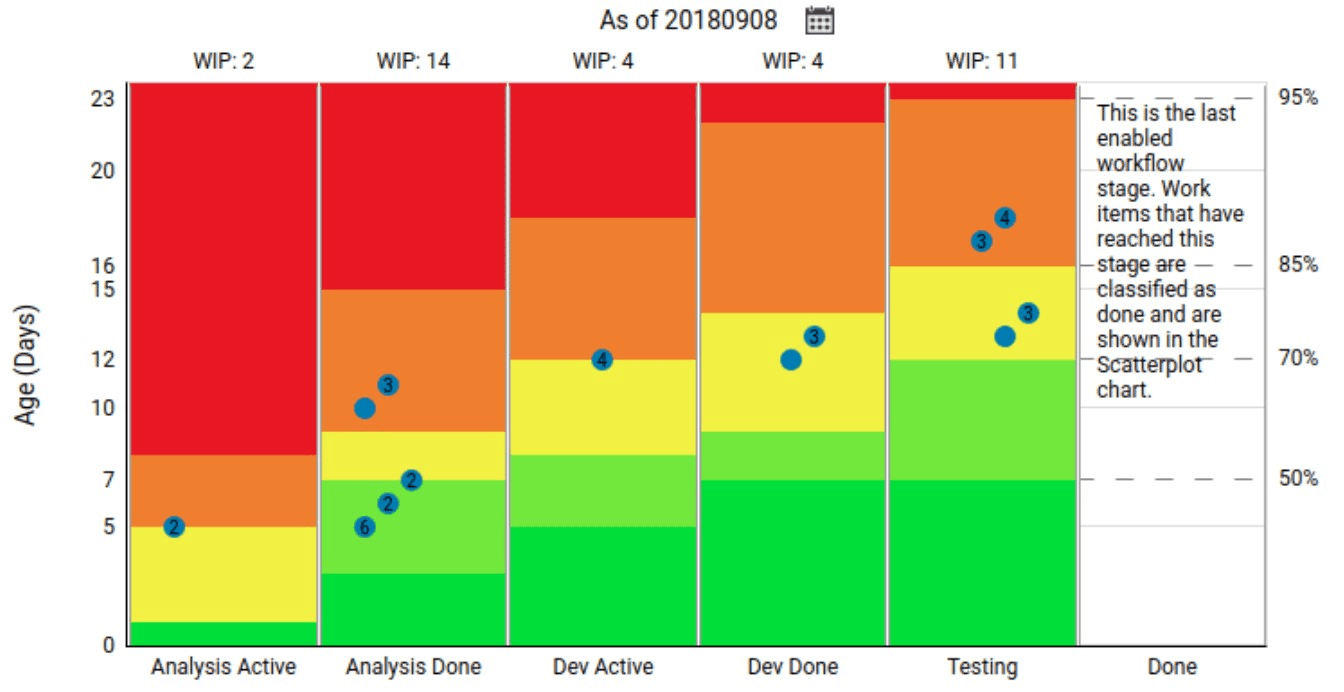
A valuable tool to help surface where delays are happening in your work, even when teams are silent, is a work item aging report. This report helps reveal which work items have been in progress the longest, and some even show how long work items have been sitting in a particular state in your kanban system. You can use this report as an early warning system against outliers.
Conclusion
There’s much more to say about blockers, delay, and removing waste in your systems. Capturing dependencies and ensuring your boards track real work, and slicing work items so they represent whole ideas are all activities you can do to minimize the time items spend sitting on your board.
 Flow Focused
Leave a comment